Repurposing One Piece of Content into Five Formats to Maximize ROI
Creating great content takes time and budget. The smarter play is to make each flagship asset work harder by turning it into multiple formats that reach different audiences and stages of the buyer journey. Repurposing isn’t lazy recycling — when done thoughtfully, it amplifies reach, improves discoverability, and shortens the path from awareness to conversion. Below is a practical, human-centered guide showing how to take one strong piece of content (I’ll call it the “anchor asset”) and turn it into five high-value formats that together multiply ROI.
Choose the right anchor asset
Not every piece deserves repurposing. Pick an anchor asset with these qualities:
Depth: it answers a meaningful customer question or solves a real problem.
Evergreen value: it remains relevant for months or years.
Measurable traction: it already gets traffic, shares, or engagement.
Repurposability: sections can stand alone as microtopics or visuals.
Good examples: a comprehensive guide, a research report, a webinar, a case study, or a long-form blog post. If you’re starting from scratch, aim to create an asset that’s at least 1,500 words or a 30–45 minute webinar — that provides enough material to extract five distinct formats.
Map repurposing to business goals
Before transforming content, define what success looks like.
Awareness: reach and impressions across social and search.
Lead gen: downloads, sign-ups, demo requests.
Engagement: time on page, video watch rate, comments.
Conversion: MQLs, trial starts, closed deals.
Knowing the priority helps you choose which formats to emphasize and which CTAs to include in each version.
Framework: One asset, five formats
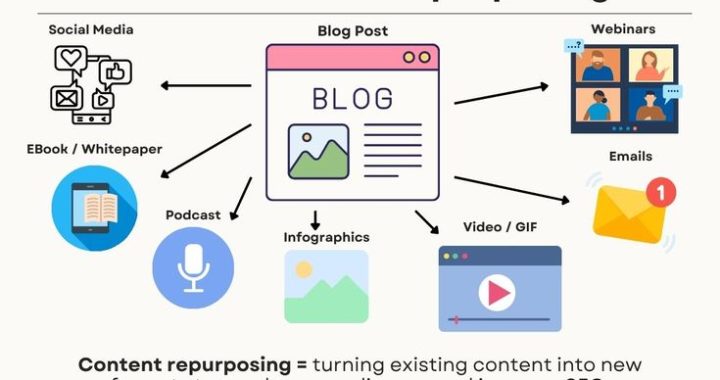
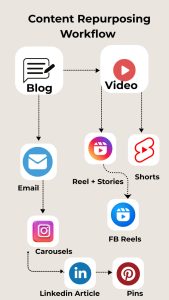
Below is a step-by-step blueprint for turning an anchor asset into five formats that complement each other: blog post, downloadable checklist/guide, short video, social carousel/micro-posts, and an email nurture sequence.
Long-form blog post (the hub)
Why: Owned, searchable, and great for SEO. It’s the central place to host the full narrative and internal links.
How to create it:
Expand the anchor: structure with clear headings, examples, and data. Aim for 1,500–3,000 words if your topic is substantive.
Add visuals: charts, screenshots, or simple infographics to break text and demonstrate points.
Optimize for SEO: target a single primary keyword plus 3–5 related keywords, use descriptive meta tags, and include semantic subheads.
Include clear CTAs: gated download, demo request, newsletter sign-up.
Internal linking: link from this post to product, case study, and related resources.
Distribution:
Publish on your blog, submit to index via Search Console, and feature in your resource hub.
Use the post as the canonical source when creating other formats.
Downloadable checklist or lead magnet (the converter)
Why: Converts readers into leads by packaging practical value into a downloadable asset.
How to create it:
Extract actionable steps or frameworks from the blog into a 1–4 page PDF.
Make it skimmable: headings, short bullets, and a one-page quick-start checklist.
Brand it, add a short author bio, and include a CTA to related services or consultations.
Gate it behind a simple form asking for name, email, and one qualification question.
Distribution:
Gated on the blog post and on landing pages.
Promote via paid ads and social posts as a focused offer.
Short video (1–3 minutes) (the engager)
Why: Video raises engagement and works well on social platforms and landing pages.
How to create it:
Script a concise narrative that covers the core problem and 3 practical solutions from the anchor.
Use on-screen bullets, a narrator or speaker, and one or two short demo clips or visuals.
Add captions and a strong CTA in the last 10 seconds (download, watch webinar, book demo).
Format versions for landscape (YouTube), square (Instagram feed), and vertical (Reels/Stories).
Distribution:
Host on YouTube and embed in the blog post and landing page.
Post native versions on LinkedIn, Instagram, Facebook, and TikTok depending on audience.
Social carousel or micro-post series (the amplifier)
Why: Carousels and micro-posts tease the content and drive traffic while delivering bite-sized value.
How to create it:
Pull 6–10 key takeaways or steps from the anchor asset; design them as a visual carousel (each slide a single idea).
Keep language punchy and visual: short headlines, statistics, and a branded end-slide CTA.
Create complementary tweet threads or LinkedIn post series using the same points but expanded into short paragraphs.
Distribution:
Publish the carousel on LinkedIn and Instagram; schedule a tweet thread on X and smaller snippets on Facebook.
Pair these posts with the short video and link to the landing page for the checklist.
Email nurture sequence (the converter + nurturer)
Why: Email moves readers from interest to action by delivering value over time and building familiarity.
How to create it:
Create a 4–6 email series based on the anchor: Problem (email 1), Insight and quick tips (email 2), Case study or proof (email 3), Deeper resource and CTA (email 4), Final nudge/offer (email 5).
Personalize where possible: use dynamic fields for name, company size, or previously viewed content.
Keep emails short, focused, and action-oriented; each email should offer immediate value and a single CTA.
Distribution:
Trigger the sequence when a user downloads the checklist or watches the video; segment based on behavior and lead score.
Monitor open, click, and conversion rates to refine content and cadence.
Practical checklist for repurposing
Identify the anchor and objective.
Break the anchor into core sections and list 10–15 extractable micro-ideas.
Map each micro-idea to the formats above.
Draft copy and visual briefs for each format.
Assign owners and timelines, and store assets in a shared folder.
Publish the hub (blog) first, then stagger supporting formats over 4–8 weeks.
Track KPIs per format and adjust distribution.

Best practices and human touches
Repurposing at scale can sound mechanical, but human touches make each format resonate.
Mirror customer language: pull direct quotes from interviews or support conversations and use them in captions, emails, and PDFs.
Localize subtly: adapt examples or metrics for key markets when repurposing high-value assets.
Use storytelling: a short anecdote or client vignette in the video and email increases trust and memorability.
Maintain consistency:keep brand voice and visual identity across formats so users recognize the same story in different places.
Respect platform norms: a LinkedIn post needs professional tone; a TikTok needs energy and immediacy.
Measure what matters
Track each format with appropriate KPIs so you know which repurposing moves drove ROI.
Blog: organic sessions, time on page, bounce rate, and conversions.
PDF/lead magnet: download rate, lead quality (conversion to MQL), and downstream revenue.
Video: views, average watch time, and click-throughs to landing pages.
Social: impressions, engagement rate, and referral traffic.
Email: open rate, click-through rate, and conversion to demo or purchase.
Use UTMs and unique landing pages to attribute conversions accurately. Evaluate the cost (production time, paid promotion) versus the incremental leads and revenue each format generates.
A simple timeline to execute
Week 1: Publish the long-form blog and create the downloadable checklist.
Week 2: Produce and publish the short video; promote it with social posts.
Week 3: Publish the carousel and schedule micro-posts; launch paid boost if needed.
Week 4: Start the email nurture sequence for anyone who downloaded or clicked.
Weeks 5–8: Monitor metrics, retarget engaged users, and repurpose additional sections into niche assets (FAQ pages, webinar topics).
Common pitfalls to avoid
Repurposing without a plan: don’t churn formats just for content volume. Tie each format to a goal.
Poor quality shortcuts: a low-effort video or sloppy PDF damages credibility.
Ignoring attribution: if you can’t measure it, you can’t optimize or justify spend.
One-size-fits-all content: tailor messaging and creative to each channel and audience segment.
Example mini-case (illustrative)
A marketing agency turned a 2,000-word SEO guide into:
A blog post that increased organic traffic by 35% in three months.
A gated checklist converting at 8% on the blog.
A 90-second explainer video that drove 1,200 views and a 4% click-through to the checklist.
A LinkedIn carousel that reached 45,000 users and generated 60 demo requests.
A five-email nurture that turned 12% of downloads into qualified demos.
The incremental cost was mostly time and minor production; the compounded ROI came from better lead quality and multiple touchpoints converting prospects at different stages.
Final checklist (quick)
Pick a durable anchor asset with traction.
Create the hub (long-form) first; make it the source of truth.
Produce a gated checklist, a short video, social microcontent, and an email sequence.
Use customer language and storytelling in all formats.
Track each format with UTMs and KPIs.
Iterate on what works and scale the formats that deliver the best ROI.
Repurposing is not a frugal afterthought — it’s a strategic multiplier. By treating one strong piece of content as an ecosystem rather than a single output, your agency can stretch creative budgets, reach audiences in their preferred formats, and build a more consistent pipeline of leads. Start with one anchor asset, follow the blueprint above, and measure closely; the first successful repurposing cycle will make the case for doing it repeatedly.